SAM Model
1. Manage SAM Model
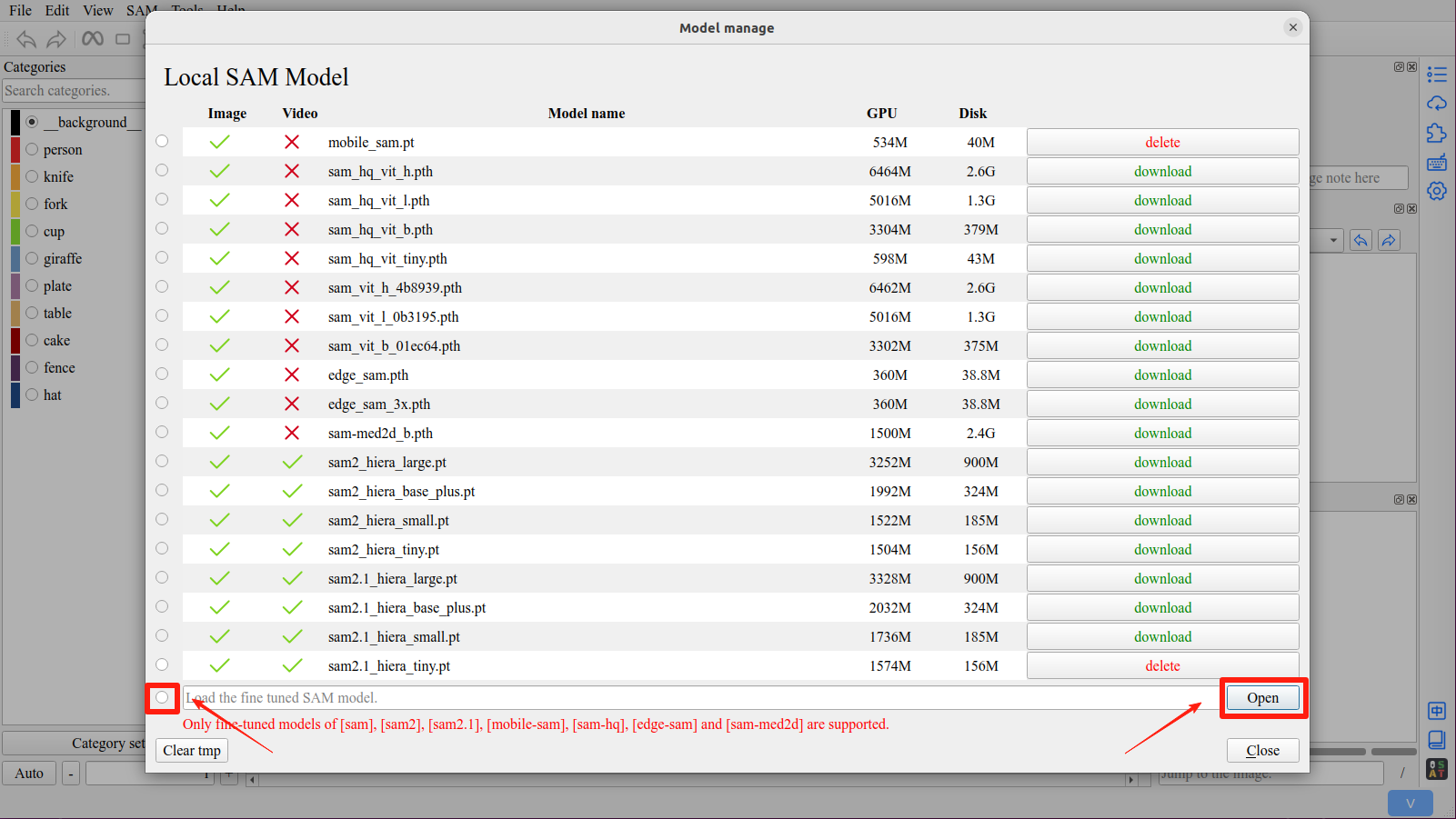
Click the Model manager button in the right toolbar to open the model manager interface
Download the required models, and click the radio button in front of the model list to activate the model.

2. Remote SAM
Click the Remote SAM button in the right toolbar to open the remote sam interface

Tip
To use the remote sam, you must first install ISAT with segment anything backend on the remote server.
On the local machine, you also need to run the SAM model for decoding.
Attention
Currently, the entire SAM model needs to be loaded locally. In future updates, when using the remote SAM, only the decode part needs to be loaded locally. This work has not been completed yet.
Danger
The feature maps of Sam-hq model is too large. Do not use Sam-hq model on remote server.
3. Supported SAM Models
Model |
Checkpoint |
Memory |
Memory (bfloat16) |
Disk |
Image |
Video |
|---|---|---|---|---|---|---|
SAM-HQ |
sam_hq_vit_h.pth |
6464M |
3378M |
2.6G |
yes |
no |
sam_hq_vit_l.pth |
5016M |
2634M |
1.3G |
yes |
no |
|
sam_hq_vit_b.pth |
3304M |
1762M |
379M |
yes |
no |
|
sam_hq_vit_tiny.pth |
598M |
392M |
43M |
yes |
no |
|
Mobile-SAM |
mobile_sam.pt |
534M |
390M |
40M |
yes |
no |
Edge-SAM |
edge_sam.pth |
360M |
304M |
39M |
yes |
no |
edge_sam_3x.pth |
360M |
304M |
39M |
yes |
no |
|
MedSAM |
sam-med2d_b.pth |
1500M |
1050M |
2.4G |
yes |
no |
SAM |
sam_vit_h_4b8939.pth |
6462M |
3378M |
2.6G |
yes |
no |
sam_vit_l_0b3195.pth |
5016M |
2634M |
1.3G |
yes |
no |
|
sam_vit_b_01ec64.pth |
3302M |
1760M |
375M |
yes |
no |
|
SAM2 |
sam2_hiera_large.pt |
3252M |
2008M |
900M |
yes |
yes |
sam2_hiera_base_plus.pt |
1992M |
1666M |
324M |
yes |
yes |
|
sam2_hiera_small.pt |
1522M |
1226M |
185M |
yes |
yes |
|
sam2_hiera_tiny.pt |
1504M |
1196M |
156M |
yes |
yes |
|
SAM2.1 |
sam2.1_hiera_large.pt |
3328M |
2266M |
900M |
yes |
yes |
sam2.1_hiera_base_plus.pt |
2032M |
1682M |
324M |
yes |
yes |
|
sam2.1_hiera_small.pt |
1736M |
1268M |
185M |
yes |
yes |
|
sam2.1_hiera_tiny.pt |
1574M |
1194M |
156M |
yes |
yes |
|
SAM3 |
sam3.pt |
8600M |
8600M |
3.5G |
yes |
yes |
Tip
If you are running ISAT on a cpu, it is recommended to use the sam_hq_vit_tiny.pth or mobile_sam.pt model.
Tip
Since v1.5.1, you can try disabling the video segmentation feature in the settings interface if you encounter insufficient VRAM.
After disabling the video segmentation feature, SAM3 requires only 6GB of VRAM to run.
4. Use fine tuned model
Click the Open button in the the model manager interface to select the fine-tuned sam model.
Important
The supported fine-tuned models: sam, sam2, sam2.1, sam3, mobile-sam, edge-sam, sam-hq and sam-med2d.